Friday, 1 November 2019

HTTP Error 500.22 - Internal Server Error (An ASP.NET setting has been detected that does not apply in Integrated managed pipeline mode.)

The issue is caused by the pipeline mode in your Application Pool setting that your website is set to.
There are two types of solutions exists,
i/ Change the Application mode to classic in IIS.
ii/ In Web.Config file add this code,
    <configuration>
      <system.webServer>
         <validation validateIntegratedModeConfiguration="false"/>
      </system.webServer>
   </configuration>
Read More

Sunday, 11 February 2018

Difference between First() and FirstOrDefault() in C#.

In this article, We will discuss about What is the difference between First() and FirstOrDefault() in C#.

First()
---------
- First method Returns the First element of a sequence.
- Generates Error If it does not contain any element.

Example:
------------
public ActionResult Index()
        {
            SampleEntities obj = new SampleEntities();

            int Id = 2;

            var memList = (from x in obj.Memberships where x.ID == Id select x).First();

            return View();
        }

In the above Code, We use Index Action method and used First() and When Id=2 match with database then it will return the result otherwise it Will generate the Error and Which is Shown in below figure,

FirstOrDefault()
--------------------
- FirstOrDefault method Returns the First element of a sequence, or a default value if the Sequence contains no elements. 
- Returns null if it does not contain any element.

Example:-

-------------
public ActionResult Index()
        {
            SampleEntities obj = new SampleEntities();

            int Id = 2;

            var memList = (from x in obj.Memberships where x.ID == Id select x).FirstOrDefault();

            return View();
        }

In the above Code, We use Index Action method and used FirstOrDefault() and When Id=2 match with database then it will return the result otherwise it Will return null and Which is Shown in below figure,

Read More

Saturday, 10 February 2018

Difference between List and IEnumerable in C#.

In this article, We will discuss about What is the difference between List and IEnumerable in C#.

List
------
- List is a Class.
- List is not read-only.
- We can able to add,delete items into List.

Example:-
-----------

      public ActionResult Index()
        {
            SampleEntities obj = new SampleEntities();

            var memList=(from x in obj.Memberships select x).ToList();

            return View();
        }

In the above example, We conside Index action method where memList is a List  and Whose add,delete method exists and Which is Shown in below figure,


IEnumerable
----------------
- IEnumerable is an Interface.
- IEnumerable is read-only.
- We can not able to add, delete items into IEnumerable because it is read-only.

Example:-
------------

public ActionResult Index()
        {
            SampleEntities obj = new SampleEntities();

            IEnumerable<Employee> objMem = _iemployeerepository.getListOfEmployee();

            return View();
        }

In the above example, We conside Index action method where memList is an IEnumerable  and Whose add,delete method does not exists and Which is Shown in below figure,


Note:- Depend upon the Situation we need to Use List and IEnumerable.
Read More

Tuesday, 14 November 2017

Formatting of numbers by Trailing Zeros in C#.

In this article, We will discuss about How to add Trailing Zeros in a String in C#.

Well, there will be Situation while development or sometimes client requirement to add Trailing Zeros to particular String and display in a Grid or SomeWhere else.

To implement Trailing Zeros in String, We have a PadRight() exist which will do the Work for Us.

PadRight() takes 2 parameters as int totalWidth(Total Width of String) and char paddingChar(Replaced by Which Char).

Let me take an example to implement Trailing Zeros.

Example:-
---------------
1/
string strNumber="123";

In this strNumber, We will apply the Trailing Zeros and Which is given below,

string strTrailingNumber=strNumber.PadRight(6,'0');

So, the output of strTrailingNumber is "123000".


2/

string strNumber="";

In this strNumber, We will apply the Trailing Zeros and Which is given below,

string strTrailingNumber=strNumber.PadRight(6,'0');

So, here the output of strTrailingNumber is "000000".
Read More

Monday, 13 November 2017

Optional Parameters in C#.

In this article, We will discuss How to use Optional Parameters in C# and also Why to Use Optional Parameters in C#.

As the name Suggests, Optional Parameters means we can pass Optional Values to Parameters in Function or methods.

Let us take an example to explain Optional Parameters,

Example:-

private void Test(string Lname,string Fname="James")
{
//rest of code
}


When i call this method Test(), then at that time Lname we need to pass and for Fname either we can pass or we cann't pass the value in it.

So we can call Test() like this,

Test("Evans"); // Here by default James take as Fname
Test("Evans","Chris"); // Here "Chris" take as Fname


We need to Use Optional Parameters, when we need to pass some default values in it.


Even if We can use [Optional] Keyword in Function defination like this and Which works Same.

private void Test(string Lname, [Optional] string Fname = "James")
        {
//rest of code
        } 


Note:- To Use [Optional] you need to include this namespace using System.Runtime.InteropServices;
Read More

Tuesday, 7 November 2017

Get All Location Details Using IPAddress in C#.

This article will tell you about how to retrieve User Locations by passing IPAddress.

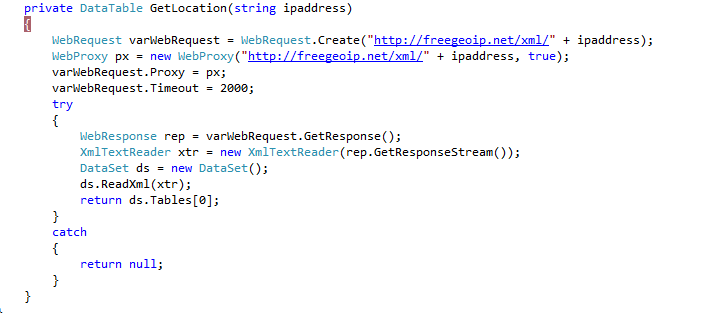
http://freegeoip.net is a free and open-source URL and by using which we can get User location like Latitude,Longitude,Country Name etc and we will check all while we will implement.

For more details you can visit this URL: http://freegeoip.net

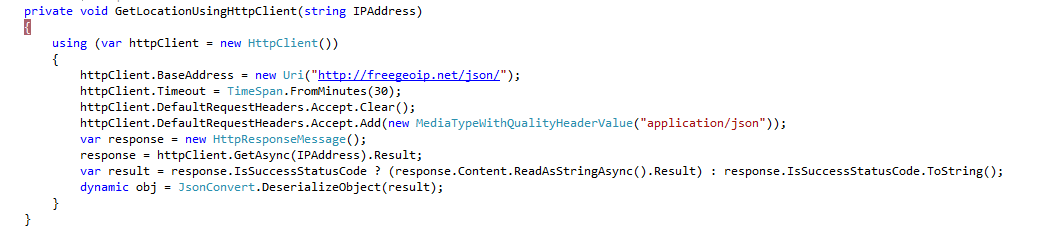
We can retrieve the data from this URL either in XML format or json format.

XML Format :-
-----------------

First we need to include using System.Net; namespace.

 As we are using XML Format so we need to use the URL like this, http://freegeoip.net/xml/ and after that we pass ipaddress. By using of WebRequest and WebResponse we can retrieve data and as we are using XML format so by Using ReadXml method we will retrieve the data and atlast we binded the data to dataset and from there we can retrieve the data.

JSON Format :- 
---------------------

To get the data in JSON format we can use two technique such as:

i/ WebClient

ii/ HttpClient

        i/ WebClient :-
-------------------

In this above code we used the URL like this, http://freegeoip.net/json/ because we are using here json format of data and when we will call this line var json = webClient.DownloadString(URL); then after that we will retrieve the data from our URL and atlast we need to convert it into json format. To Convert into json format we need to use using Newtonsoft.Json; namespace.

       ii/ HttpClient :-
       ---------------------

In the above code we used the same URL but here we used the HttpClient and by using which we can retrieve the json data.

This URL http://freegeoip.net will give you the following information as a response,

  • IP
  • CountryCode
  • CountryName
  • RegionCode
  • RegionName
  • City
  • ZipCode
  • TimeZone
  • Latitude
  • Longitude
  • MetroCode
and after that you can easily use in your project. 
Read More

Create Pdf Using ItextSharp in C#.

In this article I will explain about how to Create a new Pdf file using ItextSharp.

Before we Start Creating Pdf, in the whole article I will describe about how to create a new Pdf file easily.

ITextSharp is a .NET PDF library and for pdf conversion we are using it. Take a new solution in Solution Explorer and either you can add itextsharp dll by using NuGet package or by using
Package Manager Console or you can directly add dll in References. In the below picture I show you an example that how to install itextsharp using NuGet package.


After you installed itextsharp in your solution, Please check in your References to make sure that it exists.
After that add a new Folder Named called as “Output” where we will store the new Pdf File and whose structure looks like this,


After that create your UI like this,


When I click on Create Pdf button then at that time it will create a New Pdf and which will bestored in “Output” folder and whose code is described below,


In the first line I created the object of Document Class and the first parameter is the pagesize and here I set it as A4 and the other parameters are nothing but margin left, margin right, margin top and margin bottom.

In the next line I created a table which is called as “PdfPTable” in iTextSharp and here the table contains 4 columns and also I set the properties for tables.


After that I am going to add a new cell and that cell contains certain properties like Border, Horizontal Alignment etc and at last we will add that cell into table.


We can add as many numbers of cells and tables as we want.

After that I set the outputpath and I will open the document object and will add the table and at last will close the document object.

The ouput looks like this which is shown in the given image,


Here I have showed you a simple example but you can add any number of tables, cells, images etc and you can design your pdf as per your requirement.
Read More

Null-Conditional Operator in C# 6.0

Null-Conditional Operator is a new Concept in C# 6.0 that is useful when we want to check the null condition of an object or reference data type.  We can write an in-line null-conditional with the ? and ?? operators.
Syntax:
                Condition ? if true ?? if false
Example:-
namespace ConsoleApplication2
{
    class Program
    {
        class Employee
        {
            public string Name { get; set; }
            public Address EmpAddress { get; set; }
        }

        class Address
        {
            public string HomeAddress { get; set; }
            public string OfficeAddress { get; set; }
        }
        static void Main(string[] args)
        {
            Employee emp = new Employee();
            emp.Name = "Max";
            emp.EmpAddress = new Address()
            {
                HomeAddress = "Street",
                OfficeAddress = "Street1"
            };
            Console.WriteLine(emp?.Name);
            Console.WriteLine((emp?.EmpAddress ?.HomeAddress ?? "Nothing"));
            Console.ReadLine();
        }
    }
}

In the above example I created 2 class and which contain Some of the Properties and in the main method we assign the value to those properties. However, in this Statement,
Console.WriteLine(emp?.Name);
It will show Employee Name if it is not null.
Console.WriteLine((emp?.EmpAddress ?.HomeAddress ?? "Nothing"));

In the above Statement  if emp?.EmpAddress is not null then it will access HomeAddress else it will Show “Nothing “ in EmpAddress.
Read More

Exception Filter in C# 6.0

In this article, We will use How to use Exception Filter in C# 6.0.

Exception filter is a new Concept in C# 6.0, Where we can add if Condition in Catch Statement and if that Condition is true then that particular catch Statement will execute. But if the Condition fails then the final catch Statement will execute.

1.   using System;  
2.   using System.Collections.Generic;  
3.   using System.Linq;  
4.   using System.Text;  
5.   using System.Threading.Tasks;  
6.   using System.Console;  
7.   namespace project5  
8.   {  
9.       class Program  
10.     {  
11.         static void Main(string[] args)  
12.         {  
13.             int val1 = 0;  
14.             int val2 = 0;  
15.             try  
16.             {  
17.                 WriteLine("Enter first value :");  
18.                 val1 = int.Parse(ReadLine());  
19.                 WriteLine("Enter Next value :");  
20.                 val2 = int.Parse(ReadLine());  
21.                 WriteLine("Div : {0}", (val1 / val2));  
22.             }  
23.             catch (Exception ex) if (val2 == 0)  
24.             {  
25.                 WriteLine("Can't be Division by zero ☺");  
26.             }  
27.             catch (Exception ex)  
28.             {  
29.                 WriteLine(ex.Message);  
30.             }  
31.             ReadLine();  
32.         }  
33.     }  
34. } 
Read More

nameof Expression in C# 6.0

In this article, We will discuss How to use nameof Expression in C# 6.0.

Whenever we used any property, function or a data member name into a message as a string so we need to use the name as hard-coded in “name”. So in the Future if we want to change the message then in all the places we need to change. To avoid this problem, in C# 6.0 nameof expression was developed.

For Example
       class Employee
        {
            public int Id { get; set; } = 101;
            public string Name { get; set; } = "Max";
            public int Salary { get; set; } = 1000;
        }
  static void Main(string[] args)
   {
       Employee objEmp = new Employee();
            Console.WriteLine("{0} : {1}", nameof(Employee.Id), objEmp.Id);
       Console.WriteLine("{0} : {1}", nameof(Employee.Name), objEmp.Name);
       Console.WriteLine("{0} : {1}", nameof(Employee.Salary), objEmp.Salary);  
   }

Output:
       Id : 101
       Name : Max

       Salary : 1000


Whenever we use nameof(Employee.Id) then automatically in the output it will display Id. So no need of any hard-code anything here.
Read More

Dictionary Initializer in C# 6.0

In this article, We will discuss How to Use Dictionary Initializer in C# 6.0.

Dictionary Initializer is a new concept in C# 6.0 where Microsoft removed the Object {key,value} pair and directly we can assign values by the “=” operator.

For Example:

  Dictionary<string, string> dicStr = new Dictionary<string, string>()
            {
                ["Max"]="Texas"

            };
Read More

Difference between string.Empty and String.Empty in C#.

In this aticle, We will discuss about what is the difference between string.Empty and String.Empty in C#.

We can say both the string.Empty and String.Empty are same. Even if we can also say string.Empty is an alias name of String.Empty. But when we use String.Empty then we Should include "using System" Namespace otherwise it will generate an Error.Whenever, we hover the mouse on both string.Empty and String.Empty then it will Show that it comes under System namespace. 
Read More

Diffenence between string and String in C#.

In this article, We will discuss about what is the difference between string and String in C#.

We can say both the string and String are same. Even if we can also say string is an alias name of String. But when we use String then we Should include "using System" Namespace otherwise it will generate an Error.Whenever, we hover the mouse on both string and String then it will Show that it comes under System namespace. 
Read More

Diffenence Between string str=""; and string str1=string.Empty; in C#.

Whenever we declare string str=""; then it will create a new object. But whenever we declare string str1=string.Empty then it will create no object which makes string.Empty more efficient. However, string.Empty is a read-only field whereas "" is a compile time Constant.
So, string str1=string.Empty is the most prefered way of Writing the code. But string.Empty can't use inside Switch Case Statement because as it is a read-only so it will generate error.

string str = "";
switch(str)
{
    case string.Empty: // Error: A constant value is expected. 
        break;

    case "":
        break;

}

Read More